

Give Your Claude a Memory That Actually Sticks
AI for Real People
What "AI memory" actually looks like on your machine is a handful of one-line notes and an index file. Here's the extra layer that makes it useful: two levels of instructions, a project folder, and one skill that logs your session before your Claude forgets everything.
By default, Claude does not remember what you worked on. Neither does ChatGPT, or Gemini, or whichever one you have open right now. Every new task starts from nothing, which is why you keep retyping the same three paragraphs about your business into a fresh window like it's a first date.
Mine remembers. Not every single thing, but everything I need it to remember for the work I actually do. It took a lot of testing to get there, and none of it was about writing better prompts.
I work in Claude Cowork, so that's what I'll use here. The same solution works for any other AI, ChatGPT Work included. They all break in the same three ways, and I call it the goldfish problem.
What is the goldfish problem?
It’s the part of every single AI that dives most of us crazy and it manifests itself in 3 ways:
Memory loss is the obvious one. New session, blank slate, explain your context again and again and … AGAIN.
Selective or made up memory is the sneaky one. Claude keeps something half right, repeats it back with total confidence for three weeks, and you don't catch it until it's in a document you already sent.
Memory bloat is the one nobody warns you about, and it's why you can't just tell Claude to save everything. Six months in, half the notes are stale, some contradict each other, and Claude is choosing between two versions of your pricing with no way to know which is current.
Asking Claude to remember that you hate em dashes is worth saving. Asking it to remember every session you have ever run is how you end up with a memory that contradicts itself.
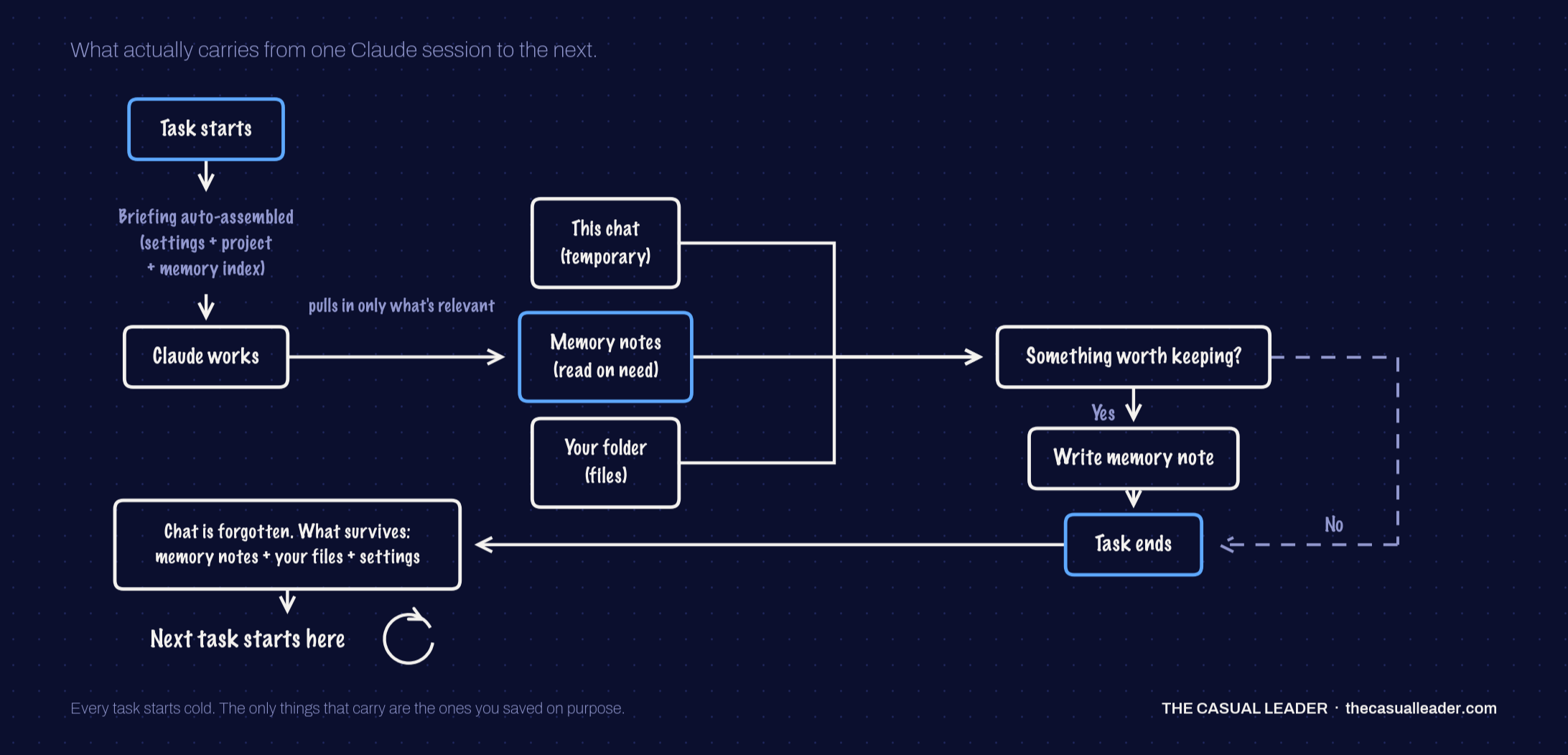
What actually carries into a new session
When you give Cowork a task, it starts with zero context, then pulls from three places before it writes a word:
Instructions, which come in two sets. The global "Instructions for Claude" in Settings apply to everything Claude: chat, Cowork, in-app Code. Cowork's own instructions apply only there.
Project level information: the description, the files, the documents, whatever lives in that project.
The memory index, the running list of short notes Claude keeps, sorted into four types. While you work, if something looks worth remembering, it writes a short summary into that project's memory. Claude decides what qualifies, fairly randomly, unless you ask it directly.
Then the session ends, and three things survive. 1) The random memory notes. 2) The files it produced, like a document or a deck. And 3) the instructions that were already in Settings. The chat itself, the hour of back and forth where you actually worked something out, none of that carries.
Useful in the moment. Frustrating later, especially when a bigger piece of work connects to a previous session and needs a knowledge base to draw on.
Two options, and why I don't pay for mine
To address this you have 2 options:
You can buy it. Tools like Mem0 sell you a memory that saves your work and follows your AI of choice across tools.
You build it, which doesn't mean building a product from scratch. It's a mix of: skill plus your settings instructions and a tool you already use. Notion in my case. Obsidian, Confluence, a personal wiki, whatever your poison is.
I don't buy mine. Migrating out is messy, the memories you export are mostly useless in the next tool, and long term you're depending on someone else's decisions about how your memory gets documented, saved and deprecated. Claude can import memories from other providers, but don't count on it being complete. If a paid tool works for you, go for it. I just want mine in a folder I control.
For context on why I chose Option 2:
AI memory nearly drove my cofounder and I into madness last year while we were building it for Ulpi.io. We read up on how human memory gets divided (short-term, long-term, explicit, implicit, episodic, semantic, procedural, and the splits vary depending on who you ask), and we looked at decay curves, scoring formulas, memories that fade inside an AI memory bank. It was insanity.
Where we landed: with the models we have access to today, long-term memory that stays accurate and useful at scale isn't feasible. So you pick the best option for the type of work in front of you. My Claude Code memory is set up a bit different than my Cowork memory, and both are simple.
Option 2 (build it) in four steps
Turn on memory in Claude:
Anthropic is rolling out an improved version of memory from chats, so what you see may shift. This step sis nice to have, not the load-bearing piece.Set up both levels of Settings instructions:
Keep the global one (Settings > General > Instructions for Claude) high level: formatting, brand colours, words to use or avoid. Cowork's own global instructions (Settings > Cowork > Global instructions > Edit) are where you get specific and pack a lot in. I show mine in The Casual Leader Podcast episode, and you can get the prompt I use to write in the free AI Memory Kit below, so you're not staring from scratch.Set up the project:
As much as you can stand to write in the description, plus a folder on your local machine for the extra files, context, assets and screenshots the work might need. No sensitive in there in there.The part that makes it work. It's two things:
1.Connect your tool: Settings > Connectors > Browse connectors > Find yours > Connect to Claude.
2. Install a skill that logs the session as you go. Mine is called /log-session-wip, which is not a creative name, but it does what it says. It's built for Notion and it's free to use, and if you're using something else there's a prompt to build your own version of it too. All free to download below.
The idea for the comes from my engineering background. You commit your work as you go so it's saved to GitHub or GitLab, not sitting on one laptop. I was missing exactly that in Cowork, so I built it, and I kept it simple.
What all 4 steps look like on a real task
I ran an ad campaign end to end for a project called SocialReply.ai . Claude pulled the screenshots out of the local folder, we went back and forth on budget, campaign types, where to start and what the landing page should do, and it built the assets. You can see the whole walkthrough on The Casual Leader Podcast.
Then, before closing the session, I ran the /log-sesion-wip skill.
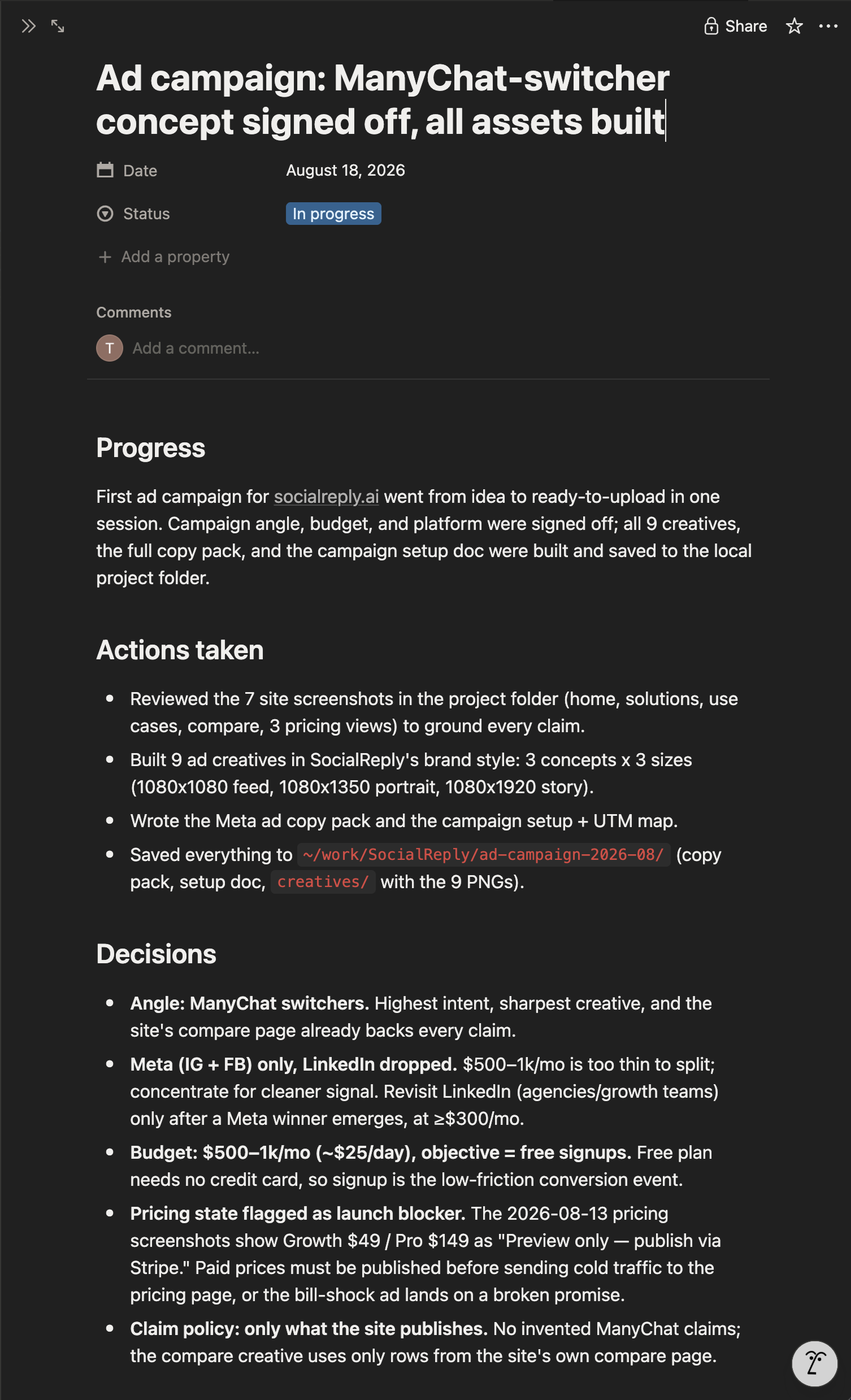
It's a slash command, so “/log” and tab. Then I told it where to log it: in Notion, in the workspace I wanted, create a section for this project and log today's session, the decisions, all of it. It made a SocialReply page with a Log inside, and every session since lands in that log as its own dated entry plus extra details.
The skill has a format built in, so each entry writes itself the same way every time: date, status, progress, actions taken, decisions made, the creative examples, any open questions, and resume context.
Resume context is the one that matters, because it lets Claude know where we left off in a brand new session, one that isn't even inside the project, and pick up at the point you stopped.
Then I opened a completely new session and didn't even select the project folder. What I typed was close to this: use Notion and give me all the information you have for the SocialReply social media campaign, and tell me where we left off so we can get started. It did.
It works in the other direction too. I added a new entry to that same Notion log by hand, dated yesterday, saying SocialReply needs to be pink in all ads. Then I asked Claude what the latest update was. It came back with the details about pink ads. One source of truth that both Claude and I are sharing, writing to, and neither of us is guessing or repeating.
What Claude's memory actually looks like on your machine
You already have this folder. Go to your user folder, hit Cmd + Shift + . to show hidden files on macOS, then Library > Application Support > Claude > local-agent-mode-sessions. Every session you have memories for is in there, plus one for your Cowork global instructions.
Each note carries a type, and there are four:
User is who you are: role, goals, how you like to work.
Feedback is corrections and confirmations saved as rules, so your "no em dashes" note lives here.
Project is ongoing work state: decisions, deadlines, open threads.
Reference is where things live, like "the session log is in Notion."
Each one is a small file with a type on it, plus a MEMORY.md index sitting on top.
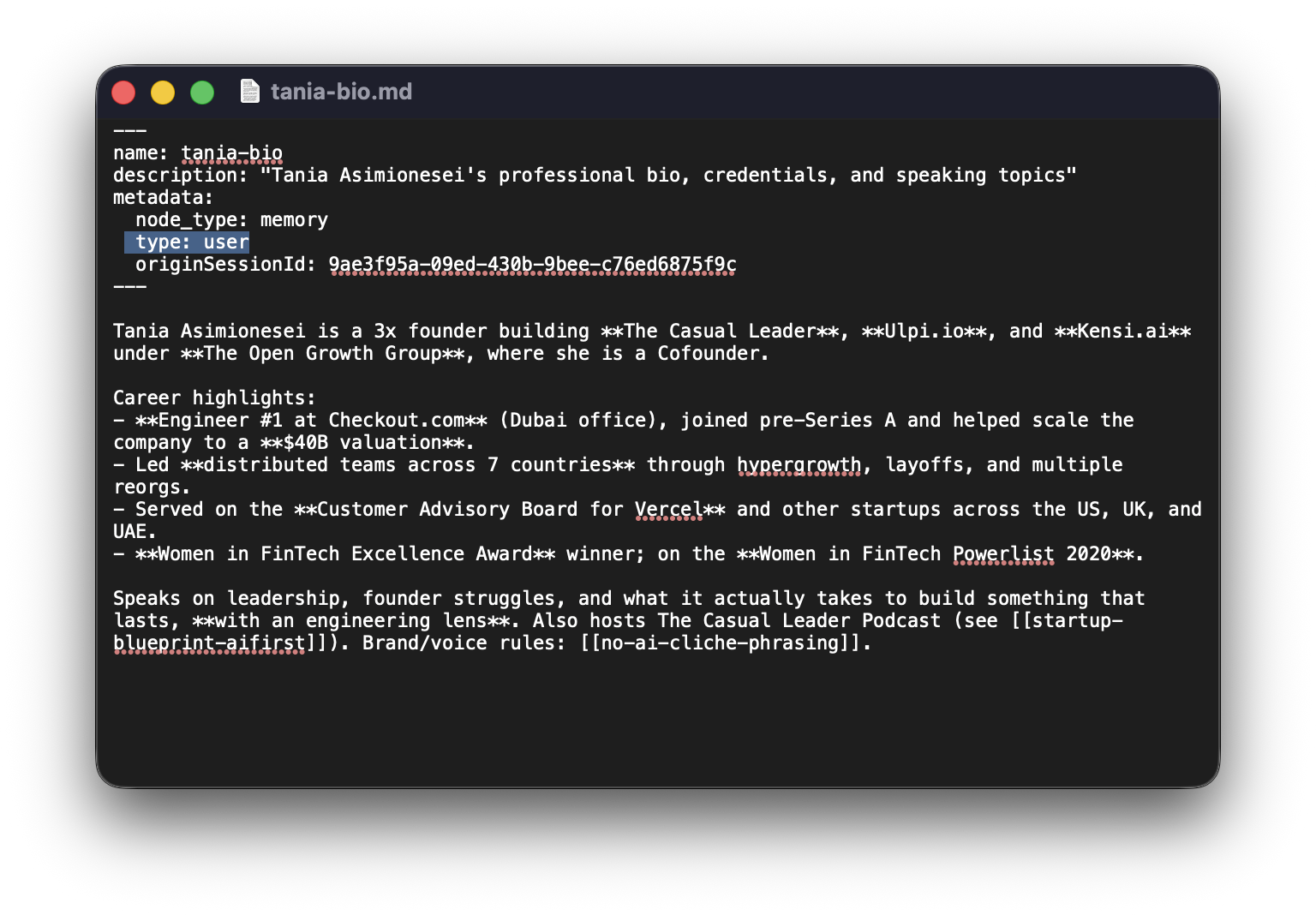
This is the Memory type User that Claude saved.
As you can see what Claude REMEMBERS about me is a very thin layer compared to my bio in the Cowork global instructions.
For You:
Pick the one project you re-explain most often. Connect your tool pf choice (Notion in my case), run a single real session in it, and log that session before you close it.
Then open a fresh session, don't select the folder, and ask Claude where that work stands. If it answers from your log, the rest is just doing it weekly. If it can't, your log is too vague, which is a five minute fix rather than a reason to buy anything.
The demo, walkthrough with the campaign on screen, the log being written in Notion and a walk through the memory folder, is on YouTube: The Casual Leader, "Give Your Claude a Memory That Actually Sticks."
Don’t forget to get your Free AI Memory Kit below to have access to:
1. /log-session-wip SKILL, instructions how to install and use it
2. Prompts on how to build your own SKILL for your tool of choice
3. Prompt on how to setup your Cowork global instructions
Start casual. Keep going. Keep growing.
