
Build Your Design System with Claude
Beginner’s Guide
Your colors, your fonts, your typography and your tone of voice, written down in one place with rules for using them. That's what a Design System is, and it's the thing that makes a one-person brand look like it has a whole studio behind it.
Most people assume getting one means hiring a designer, learning Figma, or paying an agency. In Episode 25 we built one from absolute zero, on camera, with a paid Claude subscription and nothing else. This post is the written version of that build: the flow, the prompts, what worked, and where it fell short.
What is a design system, and why start with documents?
A design system is your brand as a set of reusable rules: colors with jobs, typography with usage notes, components, spacing, and a voice. Once it exists, every new page, deck, or social asset starts from your brand instead of from a blank page.
And here's the part that sounds backwards: you don't start in the design tool. Claude Design is only as good as what you feed it, and at the start of a new brand you have nothing to feed it. So the first stop is Claude Cowork, where the raw material gets made.
Step one: let Claude interview you
In Cowork, create a project pointed at a fresh folder, and give it one task: produce four brand documents, but interview me first, acting as a brand designer, one question at a time.
These four documents are the point of the whole exercise. Tone of voice: how the brand sounds, with real sample copy. Color system: a palette where every color has a job. Mood board: the visual direction in words. Brand overview: what this is, who it's for, what it stands for.
The interview asks things like: what does this actually do at its core? Who is the one person this brand must win over? If the brand walked into a room, what would its personality be? How witty should the voice be, and it's a dial, not a switch? You answer like a founder, in plain sentences. Claude translates your answers into design language.
Ten minutes later, four markdown files existed that we would never have written by hand. The tone of voice document even came with the same message written twice: once in the brand's voice, once in the voice it should never use. That second version does more to protect your brand than a page of adjectives ever will.
If you want to prepare your answers before the interview, the free Brand Voice & Personality Worksheet walks through every question with examples, and the Brand Brief Template shows exactly what strong versions of the four documents look like. Both are on the resources page.
Step two: from documents to design system
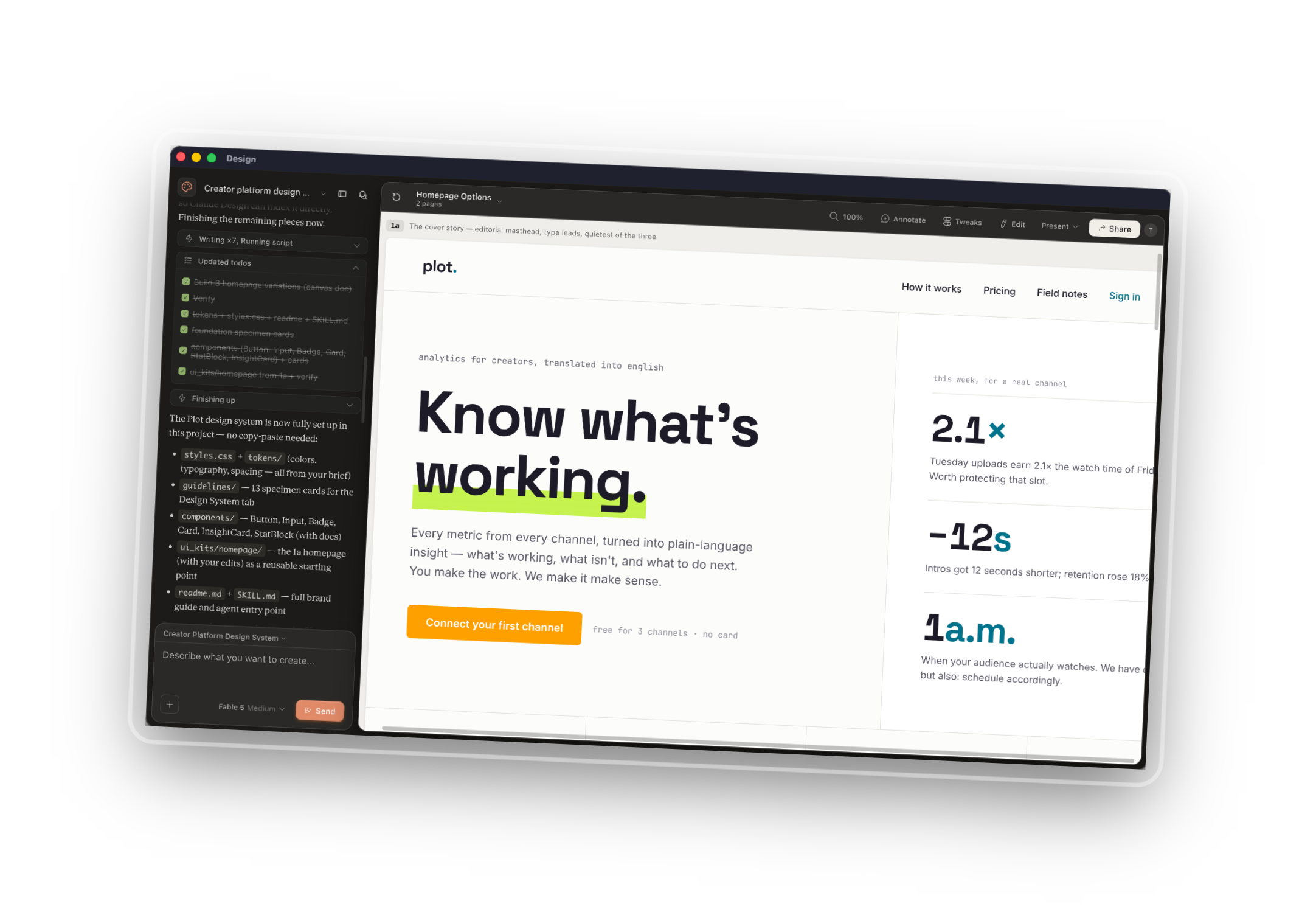
Drag the four files into a Claude Design prototype and ask for a design system plus two or three homepage variations. Ours came back with the system pulled straight from the brief, plus three named directions: an editorial page where type leads, a data-first page where the chart is the hero, and a dark version we hadn't asked for. Three real directions, one prompt.
Then you iterate. Small edits happen by hand in the editor. Global changes go through chat: swap a font everywhere, replace a color you hate (we banned four colors mid-build and Claude adjusted), or merge the hero from one variation with the chart from another.
The step most people skip is the one that matters: when you're happy, tell Claude to update the design system with every approved change, and set it up as a system you can select for future projects. The system is what you're actually building here. The homepage is just the proof it works.
Step three: the payoff, and the handoff
With the system saved, we asked for a brand-new page, a growth dashboard, in three different tones, without mentioning colors, fonts, voice, or audience once. Didn't need to; the system carried all of it. Three on-brand variations came back, and the same trick works for slides, carousels, and decks: a prompt plus a few bullet points.
When a page is ready to become real, one more prompt packages a handoff for Claude Code: a readme, the HTML reference, design tokens as JSON, the component inventory, and the brand documents, zipped. It drops into Claude Code, a developer's hands, or the no-code builder of your choice without copying a single hex code.
The honest verdict
Is it perfect? No. Claude Design is in beta: previews need refreshing, details miss, and left alone it will hand you the same two fonts every time. Will it replace great agencies and studios? No, and it shouldn't; if you're absolutely amazing at what you do, no one replaces you.
But here's the honest comparison from the episode: a previous employer once paid an agency for around six months to produce a brief and identity like this. This flow produced a decent first version in about an hour, for the price of a subscription. If you're a solo founder, a small team, or a side project without an agency budget, the barrier just fell over.
Your challenge this week
Run the interview. Open Cowork, and ask Claude to act as a brand strategist and question you, one question at a time, until it can write your four brand documents. Even if you never open a design tool afterwards, your brand will finally exist in writing, and everything else becomes possible from there.
Watch the full build, every prompt on screen, in How to use Claude Design to create a Design System and Brand from scratch episode on YouTube and Spotify.
All three free downloads, the Design System Prompt Pack, the Brand Voice & Personality Worksheet, and the Brand Brief Template can be downloaded here in one beautiful toolkit:
